AWS CLI vs MCP: Which Way Should AI Agents Talk to AWS?
One of the big open questions in the AI agent space right now is: should agents use traditional CLI tools, or structured MCP servers?
MCP (Model Context Protocol) has exploded in popularity as a way to give AI agents typed, validated tool access. AWS released an official MCP server that wraps the AWS CLI with structured input/output, command validation, and security guardrails. But does the wrapper actually make the agent better at AWS tasks? I thought this would be a nice concrete example to compare the MCP vs CLI pattern.
To do this comparison, I built an eval harness and ran 90 trials. The results were more nuanced than I expected, and the process of building the eval taught me as much as the data itself.
The Comparison
Both methods execute the same aws CLI commands under the hood. The difference is the wrapper layer:
| Direct CLI (Bash tool) | AWS API MCP Server | |
|---|---|---|
| How it works | Claude calls Bash tool, runs aws ... | Claude calls call_aws, MCP server runs aws ... |
| Shell access | Full — can pipe, chain, use jq, awk | AWS-only — rejects non-aws input |
| Discovery | Claude relies on training knowledge | suggest_aws_commands tool available |
| Safety | None built-in | Denylist, read-only mode, mutation consent |
This is an important detail: the MCP server doesn’t use a different API. It’s a validated, sandboxed wrapper around the same CLI. The question is whether that wrapper earns its overhead.
Methodology
I tested 14 tasks across 3 read-only categories, each run 3 times with both methods (84 total trials, excluding one outlier task discussed later):
- Simple Reads (5 tasks): List S3 buckets, describe EC2 instances, get Lambda config, check IAM identity, list CloudWatch alarms
- Filtered Queries (4 tasks): Tag-based EC2 filters, S3 bucket size, CloudWatch logs, security group audits
- Error Handling (5 tasks): Nonexistent resources, permission denied, invalid parameters, region mismatches, already-exists conflicts
All trials used Claude Sonnet, identical prompts, and fresh conversations. The eval harness calls the Anthropic API directly, providing either Bash or MCP tools and recording every tool call, token count, and wall-clock time.
Caveats upfront
No correctness grading. I captured automated metrics but didn’t do blind human grading of output quality. These results measure how each method works, not how well.
Three trials per task. Low sample size. Treat these as directional observations, not proof.
Read-only only. I intentionally avoided mutation tasks to avoid unintended costs for people trying to replicate the results. This means MCP’s safety features (its strongest theoretical advantage) are untested here.
Results
Overall (42 trials per method)
| Metric | CLI | MCP |
|---|---|---|
| Tool calls (mean) | 2.1 | 2.0 |
| Retries (mean) | 0.4 | 0.5 |
| Input tokens (mean) | 3.8k | 9.8k |
| Wall clock (mean) | 10.4s | 16.7s |
CLI is faster and cheaper on tokens. Tool calls and retries are effectively tied.
The Charts Tell the Real Story
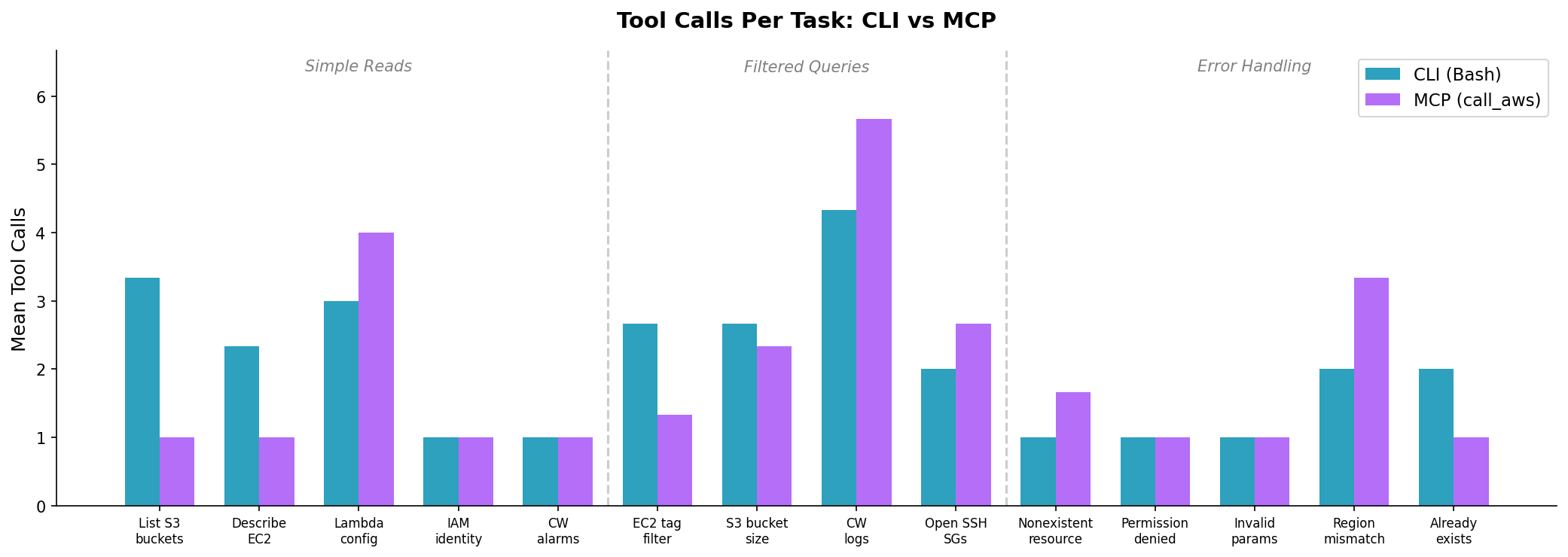
For simple one-shot tasks (IAM identity, CloudWatch alarms), both methods make exactly 1 call. MCP’s advantage only appears on “List S3 buckets” (1 call vs 3) and “Describe EC2” (1 call vs 2) — tasks where CLI’s raw text output caused Claude to retry with different formatting.
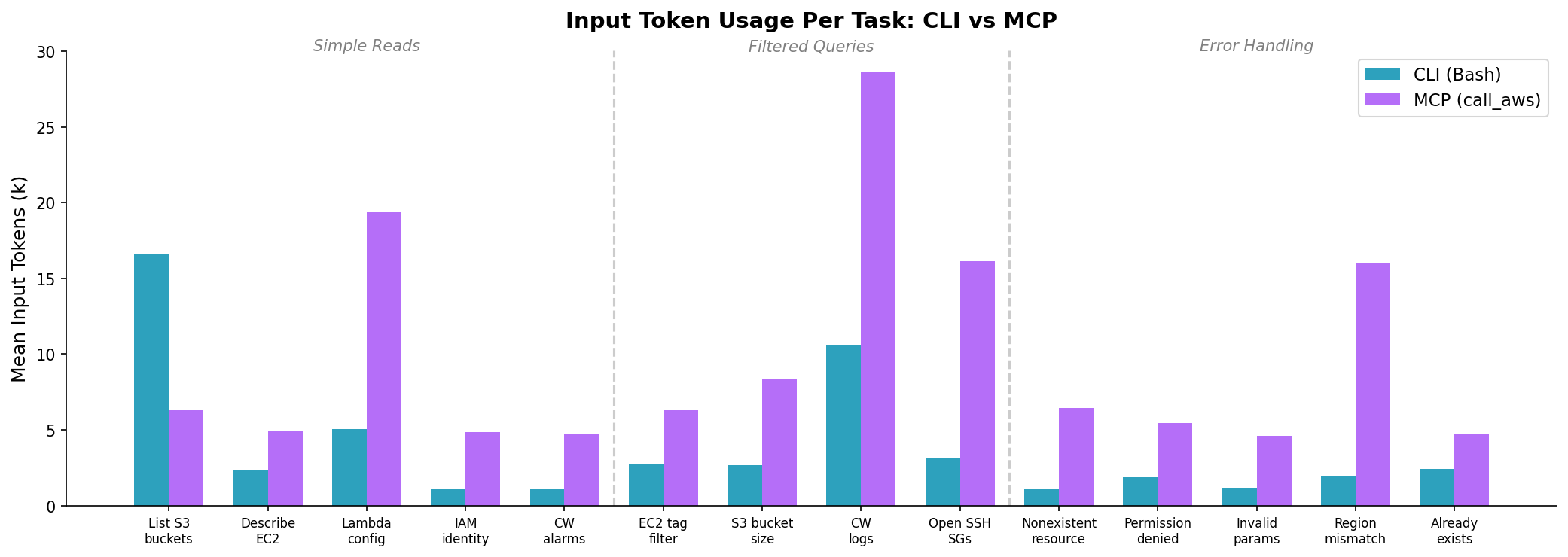
The token gap is consistent and significant. MCP uses 2.5x more input tokens on average. This comes from two sources: the MCP tool schemas are larger than a single Bash tool definition, and MCP responses are wrapped in JSON with metadata (cli_command, status_code, error_code, pagination_token). At scale, this is real money.
Examples
Example 1: List S3 Buckets — MCP Wins
Prompt: “List all my S3 buckets with their creation dates.”
The account has 71 buckets. Here’s how each method handled it:
CLI approach (3.3 calls avg, 16.6k tokens, 22s):
Tool call 1: bash(aws s3api list-buckets)
→ Got raw JSON... output was long, tried to reformat

Tool call 2: bash(aws s3api list-buckets --query "Buckets[*].[Name,CreationDate]" --output table)
→ Table output was truncated

Tool call 3: bash(aws s3api list-buckets --query "Buckets[*].[Name,CreationDate]" --output text | sort)
→ Finally got a usable list
Claude kept trying different output formats because the raw JSON for 71 buckets was unwieldy. The Bash tool returns unstructured text, so Claude couldn’t tell if it had everything without reformatting.
MCP approach (1 call, 7.3k tokens, 17s):
Tool call 1: call_aws(aws s3api list-buckets)
→ Got structured JSON with all 71 buckets, immediately formatted a markdown table
The MCP server returns parsed JSON in a structured envelope. Claude got the complete data in one call and rendered it directly. No reformatting needed.
Takeaway: When the output is large, MCP’s structured responses help Claude avoid the “let me try a different format” loop.
Example 2: Describe EC2 Instances — MCP Wins
Prompt: “Show all running EC2 instances in us-east-1 with instance type and public IP.”
CLI approach (2.3 calls avg, 2.4k tokens, 11s):
Tool call 1: bash(aws ec2 describe-instances --filters Name=instance-state-name,Values=running --region us-east-1)
→ Got results, but sometimes retried with --query to narrow the output
MCP approach (1 call, 4.9k tokens, 7s):
Tool call 1: call_aws(aws ec2 describe-instances --filters Name=instance-state-name,Values=running --region us-east-1)
→ Structured response, immediately extracted the relevant fields
Takeaway: Similar pattern — MCP’s structured output eliminated retry attempts.
Example 3: Invalid Bucket Name — Both Handle It Well
Prompt: “Create an S3 bucket called ‘INVALID_UPPERCASE_BUCKET’.”
CLI approach (1 call, 1.2k tokens, 6s):
Tool call 1: bash(aws s3api create-bucket --bucket INVALID_UPPERCASE_BUCKET)
→ Error: "An error occurred (InvalidBucketName)"
→ Claude explained: "S3 bucket names must be lowercase, 3-63 characters..."
MCP approach (1 call, 4.6k tokens, 7s):
Tool call 1: call_aws(aws s3api create-bucket --bucket INVALID_UPPERCASE_BUCKET)
→ Error in structured JSON: {"error": "An error occurred (InvalidBucketName)"}
→ Claude explained the same naming rules
Takeaway: For straightforward errors, both methods perform identically. The structured response didn’t improve error recovery.
The Measurement Bug
In my first run, the harness reported zero MCP errors which looked like a massive win, but it was too good to be true
The MCP server wraps AWS errors inside a successful protocol response (is_error=false). My harness was only checking the protocol-level flag, so it counted every MCP call as successful, even when the underlying AWS command failed.
I had to add response body parsing to detect errors like "error": "An error occurred (ResourceNotFoundException)" inside the MCP JSON. After the fix, MCP’s error count went from 0 to 39 — comparable to CLI’s 32.
If you’re building tooling on top of the AWS API MCP Server, don’t trust is_error alone. Inspect the response body.
The Outlier: Cross-Service Lambda Metrics
I excluded one task from the main results because it dominated the averages. Task 2.5 asked: “For each Lambda function, show its name, runtime, and the number of invocations in the last 24 hours.”
This requires calling lambda list-functions and then cloudwatch get-metric-statistics for each function — a cross-service join.
| CLI | MCP | |
|---|---|---|
| Tool calls | 8 | 4 |
| Input tokens | 38.6k | 27.6k |
| Wall clock | 2.9 minutes | 31 seconds |
CLI spent nearly 3 minutes thrashing — listing functions, querying metrics one by one, losing track of state. MCP was dramatically more efficient here. Including this task in the averages would make MCP look like the clear winner, which would misrepresent the pattern across the other 14 tasks.
I believe this shows MCP’s real advantage: not on simple tasks, but on complex multi-step workflows where structured output helps the model maintain state across calls.
The Counter-Arguments
“You’re comparing a wrapper to the thing it wraps.” Fair. Both methods run aws commands. If you already have Claude Code’s Bash tool permission-gated and a scoped IAM policy, MCP’s safety features are partially redundant.
“The model didn’t use suggest_aws_commands.” Claude never called suggest_aws_commands or get_execution_plan in any of the 45 MCP trials. The model already knows the CLI well enough for common operations. These tools may only matter for obscure APIs — which I didn’t test.
“Token counts are misleading without correctness.” A method that uses 50% fewer tokens but gives wrong answers isn’t more efficient — it’s just broken. Without correctness grading, I can’t separate “efficient and right” from “efficient and wrong.”
“n=3 is not science.” Three trials per task provides directional signal at best. A rigorous eval would need 20+ trials with blind human grading.
What I’d Recommend (Provisionally)
| Scenario | Use | Why |
|---|---|---|
| Simple queries | CLI | 2.5x fewer tokens, faster on one-shot tasks |
| Large output tasks | MCP | Structured JSON prevents reformatting loops |
| Multi-step workflows | MCP | Better state tracking across calls (per outlier task) |
| Security-sensitive environments | MCP (untested) | Denylist, read-only mode, shell injection prevention |
| Cost-sensitive batch work | CLI | Token overhead of MCP compounds at scale |
Try It Yourself
The eval harness, task definitions, scoring rubric, and raw results are open-source on GitHub. Run it against your own AWS account:
git clone https://github.com/drewdresser/aws-cli-vs-mcp
cd aws-cli-vs-mcp
uv sync

echo 'ANTHROPIC_API_KEY=sk-ant-...' > .env
echo 'AWS_PROFILE=your-profile' >> .env

uv run python main.py run --safe-only --method both --trials 3
The harness has 35 total tasks including mutations and safety tests — I only ran the read-only subset. If someone runs the full suite with correctness grading, I’d love to see the results.